The Chord progressions panel keeps sequences of chords: the six starters that come with the app, and any you write yourself. Each chord is stored as a step of the scale rather than a fixed note, so changing a progression's key transposes the whole thing and spells every chord correctly in the new key.
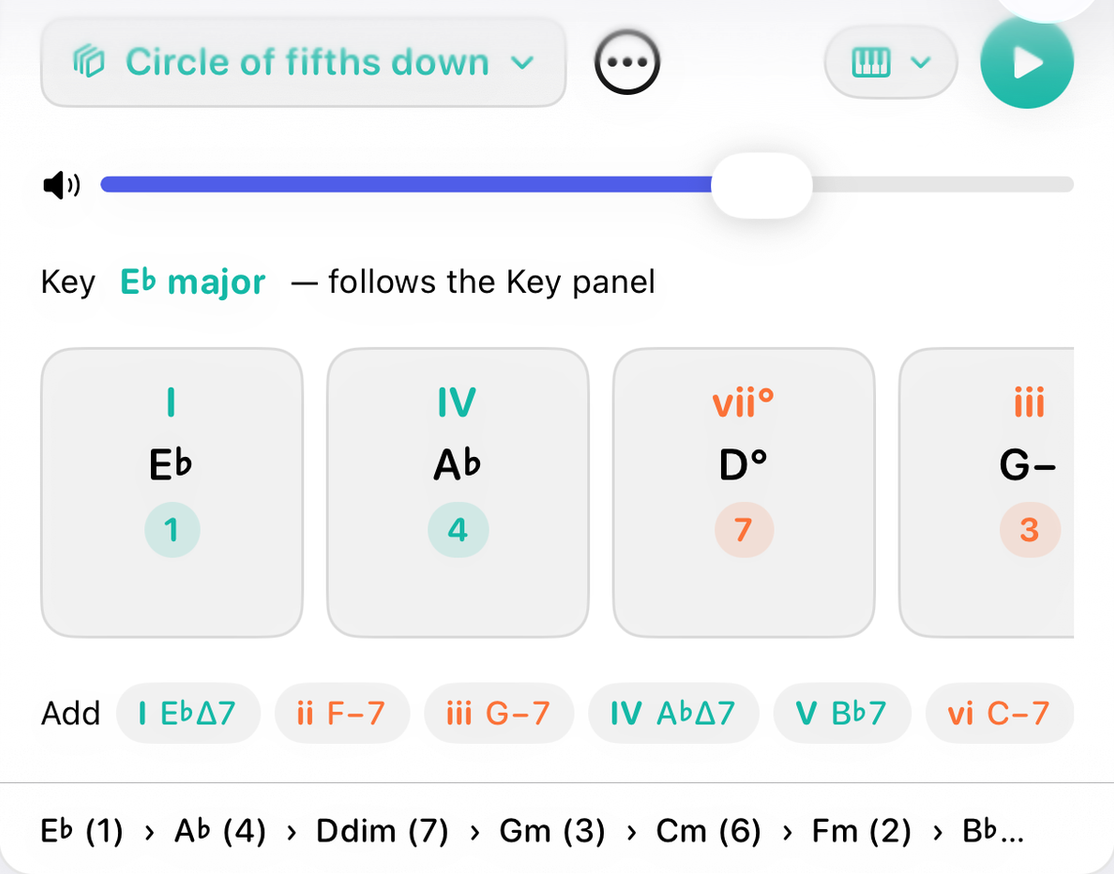
The top row
- The progression's name
- Opens the library: a list of your progressions in alphabetical order, then a Starters heading and the six starters, also alphabetical. Each row shows its chords and its key; your own also show when they were last changed. Tap a row to open it. Swipe a row to delete it.
- The ⋯ menu
- Rename…, New progression, Duplicate and Delete. On your own progressions there is also Use this key everywhere, which sets the app's key to the progression's, so the Key panel, the wheel and the instruments follow it.
- Volume, instrument and Play
- The instrument menu chooses piano or guitar for playback. Play runs the progression once through, highlighting each card as it sounds, and turns into Stop while it plays. On guitar each chord is voiced as a real shape in your current tuning and strummed; on piano it is stacked in thirds. The beat is the same either way.
The key line
A starter has no key of its own. It shows the Key panel's key with the words "follows the Key panel", and it changes whenever that key does. That makes a starter a quick way to hear a familiar pattern in any key: pick the key on the wheel and press Play.
Your own progressions keep the key they were written in. They show a note and mode menu instead, and changing either transposes the progression. The Key panel doesn't move them.
The cards
One card per chord, left to right in playing order. A card shows:
- Roman numeral
- The chord's numeral in the progression's key, colored by quality.
- Chord symbol
- In your chosen notation style.
- Scale step
- Which step the root sits on: 1, 4, ♭7. A padlock beside it means the chord is pinned.
- "borrowed"
- Shown when the chord's root isn't one of the key's own notes, such as a ♭VII in a major key. A chord on one of the key's degrees isn't called borrowed, even when its quality differs from the key's own chord there, which is how a blues reads as I⁷ IV⁷ V⁷ rather than as twelve borrowed bars.
Tap a card to make it the current chord and hear it on the chosen instrument. Press and drag a card to move it.
The card menu
Long-press a card on iPhone and iPad, or right-click it on the Mac:
- Move left and Move right.
- Insert before and Insert after, which add the current chord from the Chord panel beside this one.
- Duplicate, which adds a copy right after it.
- Replace with the current chord.
- Pin, which fixes the chord to its present root so it stays put when the key changes.
- Delete.
Adding chords
- The dashed card
- After the last card, a dashed tile shows the current chord with a plus sign. Tap it to add that chord to the end.
- The Add row
- Under the cards, one chip for each degree of the key, as triads or sevenths following the Key panel's switch. Tap a chip to add that chord. When the current chord isn't in the key, it leads the row in red, so a borrowed chord is one tap away.
- From the Chord panel
- Add to progression in the Chord panel's footer does the same from there.
The footer
The whole progression on one line, each chord with its step: E♭ (1) › A♭ (4) › Ddim (7) › …
Starters and your own
The six starters are I – V – vi – IV, ii – V – I, I – vi – IV – V, the circle of fifths both down and up, and a 12-bar blues. Editing or renaming a starter never changes it: you get your own copy, in the current key, and are asked to name it. Deleting a starter hides it on that device.
A new progression asks for a name as it is created. Leave it empty and it is numbered for you.
How it works
Each chord is saved as a scale step plus its distance from the tonic, never as a letter name. When the key changes, each step is rebuilt from the new tonic, so every chord moves together and is spelled for the new key: I – IV – V in E♭ becomes I – IV – V in A, with sharps where E♭ had flats.
A chord that was in the key when you added it also takes its quality from the key, so I – V – vi – IV in C major reads i – v – ♭VI – iv in C minor. A borrowed chord keeps the sound it was entered with, and a pinned chord keeps its root as well. A minor 12-bar blues takes minor sevenths on i and iv and keeps the dominant on V, the pull home.
With the other panels
Tapping a card sets the current chord everywhere. The Notation panel's Progression view writes the selected progression out in full, with its key signature. Your progressions travel to your other devices through iCloud.