The Guitar panel shows playable fingerings for the current chord. There is no chart behind it: shapes are searched on the neck for whatever chord and tuning you choose, so every one of the 52 chord types works in all eight tunings.
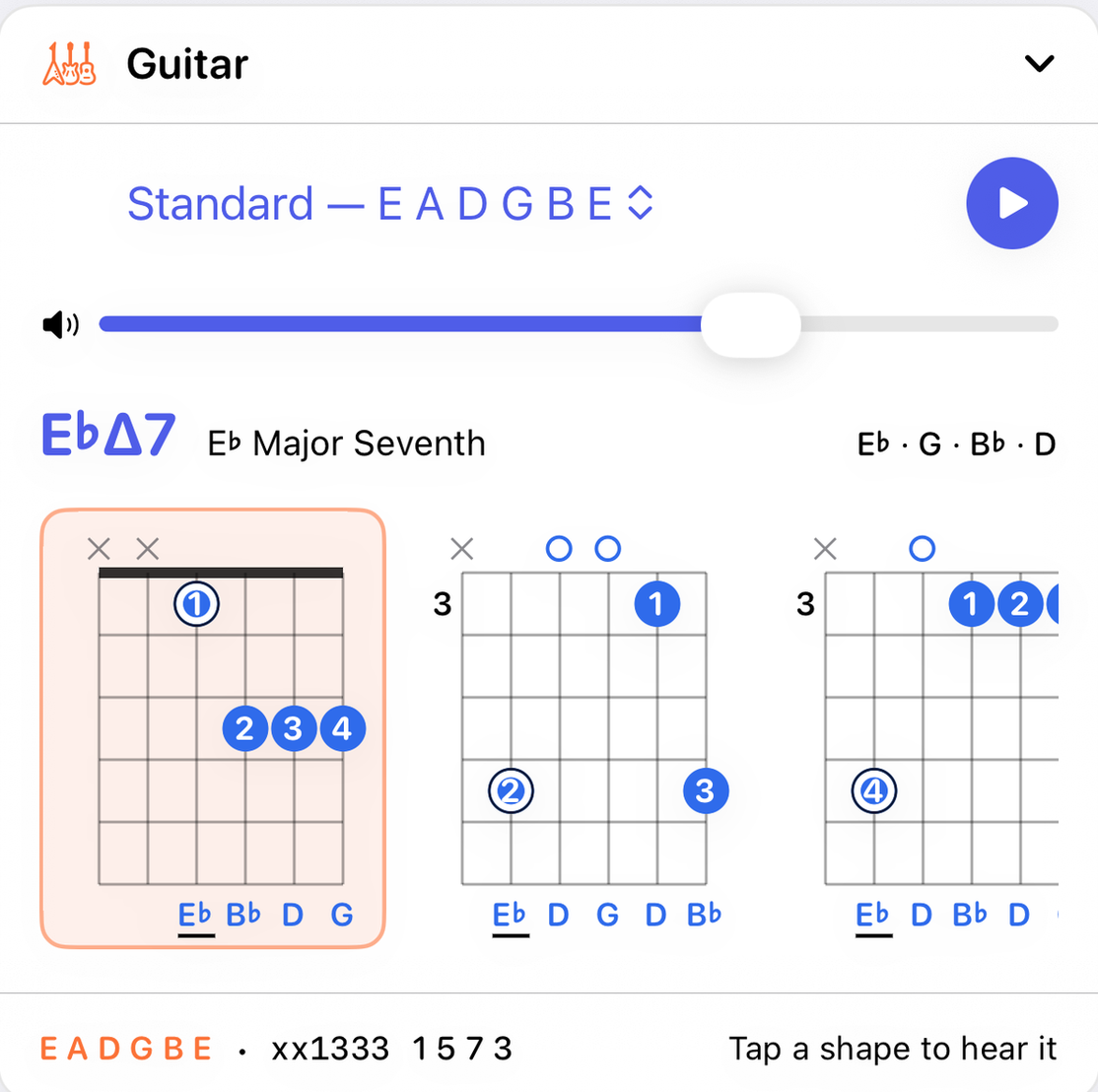
The top row
- Tuning
- Each tuning is listed with its strings, low to high:
| Tuning | Strings |
|---|---|
| Standard | E A D G B E |
| Drop D | D A D G B E |
| Half step down (E♭) | E♭ A♭ D♭ G♭ B♭ E♭ |
| Whole step down (D) | D G C F A D |
| Drop C | C G C F A D |
| Open G | D G D G B D |
| Open D | D A D F♯ A D |
| DADGAD | D A D G A D |
- Volume and Play
- Play strums the selected shape on a recorded nylon-string guitar. A guitar chord is always strummed rather than struck. With Arpeggiate chords on in Settings the strum is slower and more spread.
The chord line
The chord's symbol, its full name (E♭ Major Seventh), and its notes, so the panel says what its shapes are shapes of.
Reading a diagram
Each diagram is the neck seen face on, low E string on the left, with the nut or the starting fret at the top.
- Numbered dots
- Where to put a finger, and which one: 1 index, 2 middle, 3 ring, 4 little.
- ✕ and ○
- Above the strings, ✕ means don't play that string and ○ means play it open.
- Fret number
- A shape further up the neck shows the fret it starts on, to the left of the grid.
- Barre
- A grey bar means one finger presses several strings at once. It is grey because the strings under it play different notes; the dots on it carry the real colors.
- Note names
- Under each sounding string, the note it plays. The root is underlined.
- Color
- The same rule as the Piano: blue for a note in the key, amber for one outside it, and a ring on the root.
Scroll the row sideways for other shapes, further up the neck or voiced differently. Tap a shape to select it and hear it. If a chord has no playable shape within the first twelve frets of a tuning, the panel says so.
The footer
The tuning's strings, then the selected shape in compact form, such as x32010 (one character per string, low to high: ✕ muted, 0 open, a number for the fret), then the interval each string plays, such as 1 3 5 1 3. barre and open tags appear when they apply.
How the shapes are found
The app slides a four-fret window up the neck, the span a hand covers without shifting, and tries every combination of muted, open and fretted strings inside it. Each candidate is scored, and four rules decide which shapes come first:
- The bass comes first. A shape whose lowest note isn't the chord's bass note is pushed down the list, so an inversion is never shown as a root-position shape.
- Muted strings are judged by where they are. Muting below the bass is free, which is why
xx0232is D. Muting above the top note costs a little. Muting a string between two sounding strings is a last resort. - A shape is dropped only when a better one covers it, the same frets with fewer mutes. That keeps the familiar
x32010C rather than losing it to a G-bass shape that contains it. - A barre is used only when the hand runs out of fingers, more than four fretted strings, and only across the lowest sounding string. That gives
133211for F, and no barred D.
The result is the shapes you'd find in a chord book for common chords, C x32010, G 320003, Am x02210, D xx0232, E 022100, A x02220, and sensible ones for chords no book bothers with.
With the other panels
The Guitar follows the current chord and its inversion. When the Chord progressions panel plays on guitar, each chord is voiced with the first shape this panel would show for it, in the tuning chosen here.