
The Piano panel shows the current chord on a keyboard, and works the other way too: tap a chord in, note by note, and press Identify to have it named.
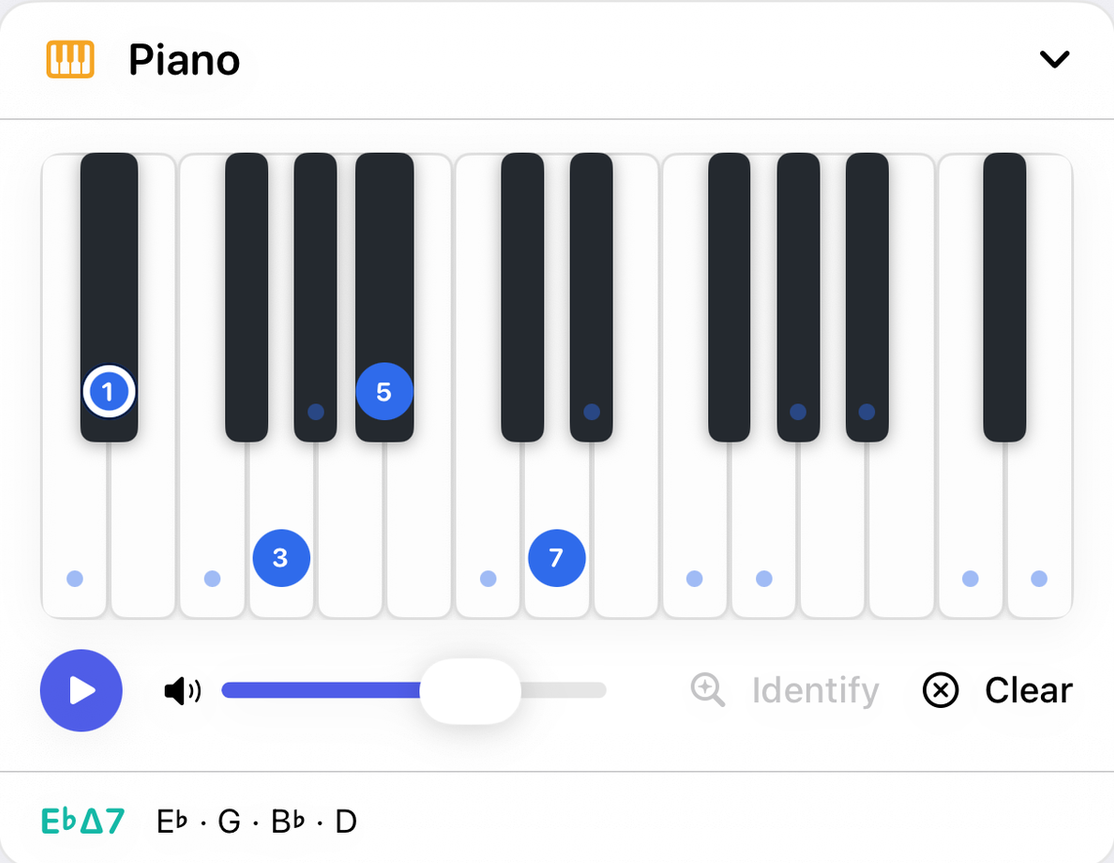
Reading the keyboard
- Chord markers
- Each note of the current chord is marked once, at the octave it is voiced in, with its interval from the root: 1, 3, 5, 7, ♭3 and so on.
- Color
- Blue means the note belongs to the current key; amber means it doesn't. That is all color says on the keyboard.
- The ring
- The chord's root carries a white ring with a dark edge. The ring sits on top of the color, so a root from outside the key is amber with a ring and still reads as an outsider.
- Small dots
- Every key that belongs to the current key, chord or not, has a faint dot near its bottom edge. Together they show the scale across the keyboard.
- Where it starts
- The keyboard starts on the chord's bass note, so a chord and its inversions read left to right from the bottom up.
- Range
- An iPhone shows two octaves, so the keys stay wide enough to hit. On iPad and Mac it shows three by default. On the Mac, Settings sets the lowest octave and how many octaves are shown.
Entering a chord
- Tap a key
- Adds that note to your selection and sounds it. A tapped note that isn't in the current chord is marked with its name. Tap it again to take it away; removing a note is silent.
- Watch the Chord panel
- As you tap, the Chord panel's Chords containing your selection row lists every chord that includes your notes, so you can see the candidates while the chord is only partly there.
- Identify
- Names what you have tapped and makes it the current chord, so the Chord, Notation and Guitar panels follow. The button is available only when your notes spell a chord exactly, so it also tells you whether the app recognises the set. When the notes could be named more than one way, it prefers the reading rooted on the current chord's root, so adding a ♭7 to a C minor triad gives Cm7.
- Play
- Sounds exactly the notes the keyboard has marked. Keys change shade while they sound, during progression playback too.
- Clear
- Empties the keyboard, chord markers included, ready for a new chord. It fills back in as soon as there is a new chord to show, from Identify or from any other panel.
Tapping keys never renames the chord on its own, so building a four-note chord one key at a time doesn't flicker through wrong names on the way. Nothing changes until you press Identify.
The footer
The current chord's name and its notes spelled out, such as E♭Δ7 E♭ · G · B♭ · D.
With the other panels
The keyboard always shows the current chord, wherever it was chosen. Its colors follow the key from the Key panel or the wheel. Identify sends a chord back out to every panel. The Piano's Play button shares its volume with all the others.