The Circle of fifths is where you choose a key, and where you see how that key sits among the other twenty-three. It is the first panel on screen when you open the app.
What you see
- The heading
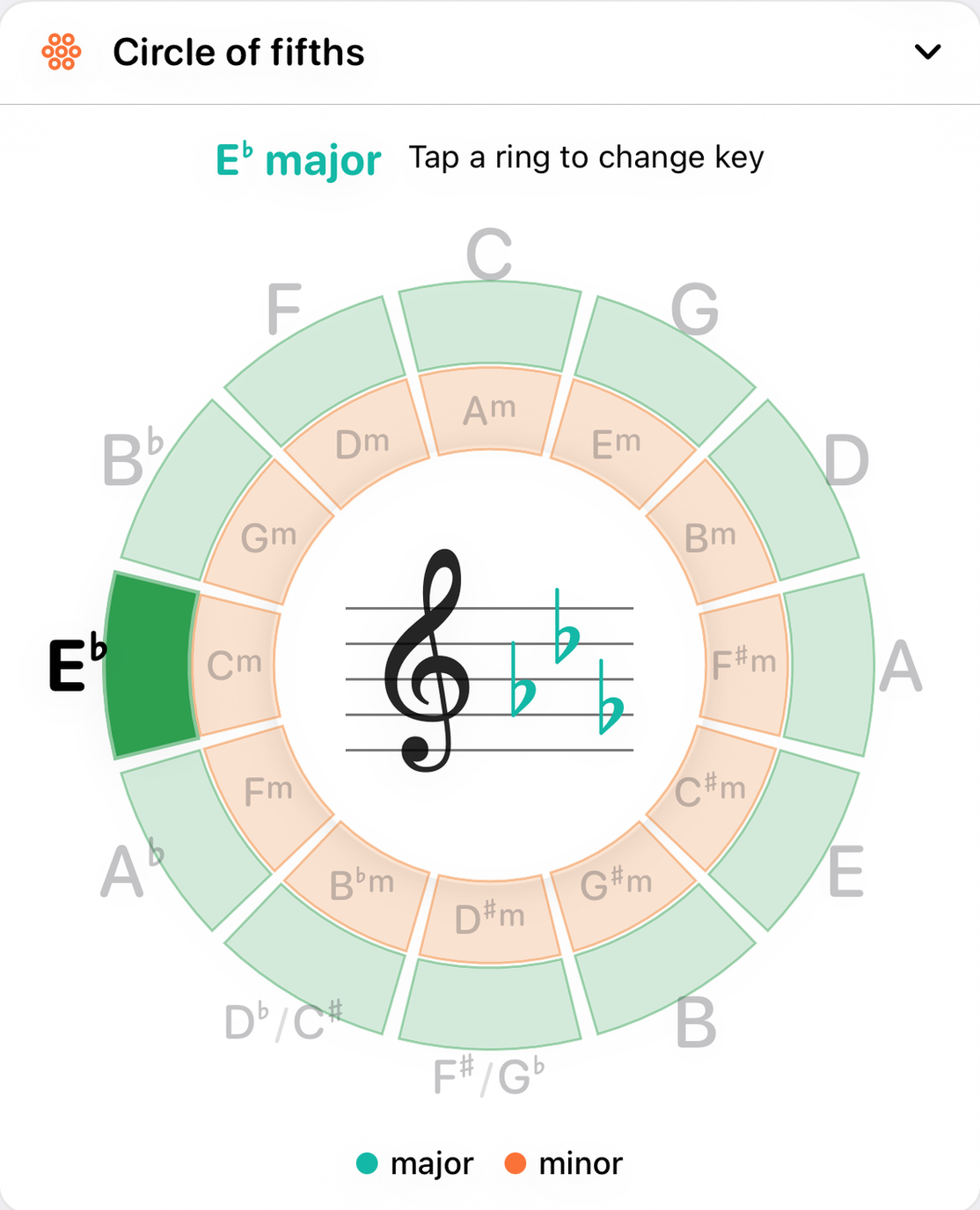
- The selected key's name, such as E♭ major, with the reminder "Tap a ring to change key". At the two positions where a key has two common spellings, both are named: F♯/G♭ and D♭/C♯.
- The outer ring: major keys
- Twelve green wedges, one per major key, arranged in fifths. C is at the top. Going clockwise each key is a fifth higher than the last: C, G, D, A, E, B, F♯/G♭, D♭/C♯, A♭, E♭, B♭, F, and back to C.
- The inner ring: relative minors
- Twelve orange wedges, each sitting just inside the major key it shares a signature with. Am sits under C, Em under G, Cm under E♭, and so on.
- One solid wedge
- Exactly one wedge is filled solid at any moment: the key you have selected, on whichever ring it belongs to. Every other wedge and name is muted, so the one key you are in is the only thing that stands out. A wedge never changes its hue, only its intensity.
- The centre: the key signature
- The selected key's signature, written on a treble staff with engraved sharps and flats in their conventional positions. The staff is sized to the key, so a short signature like one sharp is drawn large and a seven-sharp signature still fits inside the ring.
- The legend
- Under the wheel, a reminder of which color is major and which is minor.
How to use it
- Tap an outer wedge
- The app switches to that major key, and the current chord becomes the key's tonic triad: tap G and you are in G major with a G chord.
- Tap an inner wedge
- The app switches to that natural minor key, and the chord becomes its tonic minor triad: tap Em and you are in E minor with an E minor chord.
- Other modes
- Harmonic and melodic minor, and the modes from dorian to locrian, are chosen in the Key panel. The wheel still lights one wedge for them: modes with a minor third (dorian, phrygian, locrian and the minors) on the inner ring, and lydian and mixolydian on the outer one.
The wheel scrolls with the page like any other panel. A tap picks a key; a swipe that starts on the wheel scrolls past it.
How it works
Neighbouring keys on the circle differ by a single note. Each step clockwise adds one sharp to the signature, or takes away one flat; each step anticlockwise does the opposite. That is why keys next to each other sound close, and why a modulation to a neighbour is the gentlest a piece can make.
A major key and the minor key inside it, its relative minor, use exactly the same notes and signature. Their tonics are a minor third apart: A minor starts three semitones below C. Reading straight across the wheel takes you to the key furthest away, a tritone off, sharing almost nothing.
The same key can be spelled two ways at the bottom of the circle. F♯ major has six sharps and G♭ major six flats, and they sound identical. Chord Therapy names both rather than choosing one for you.
With the other panels
Changing key here changes it everywhere. The Key panel lays the new key out, the Piano and Guitar recolor which notes belong, starter progressions transpose to it, and the Notation panel's progression view writes its signature. Changing the key in the Key panel lights the matching wedge here in the same way.