The Chord panel names, spells and plays the current chord. It is also where you look a chord up, either by its name or by the notes you are holding.
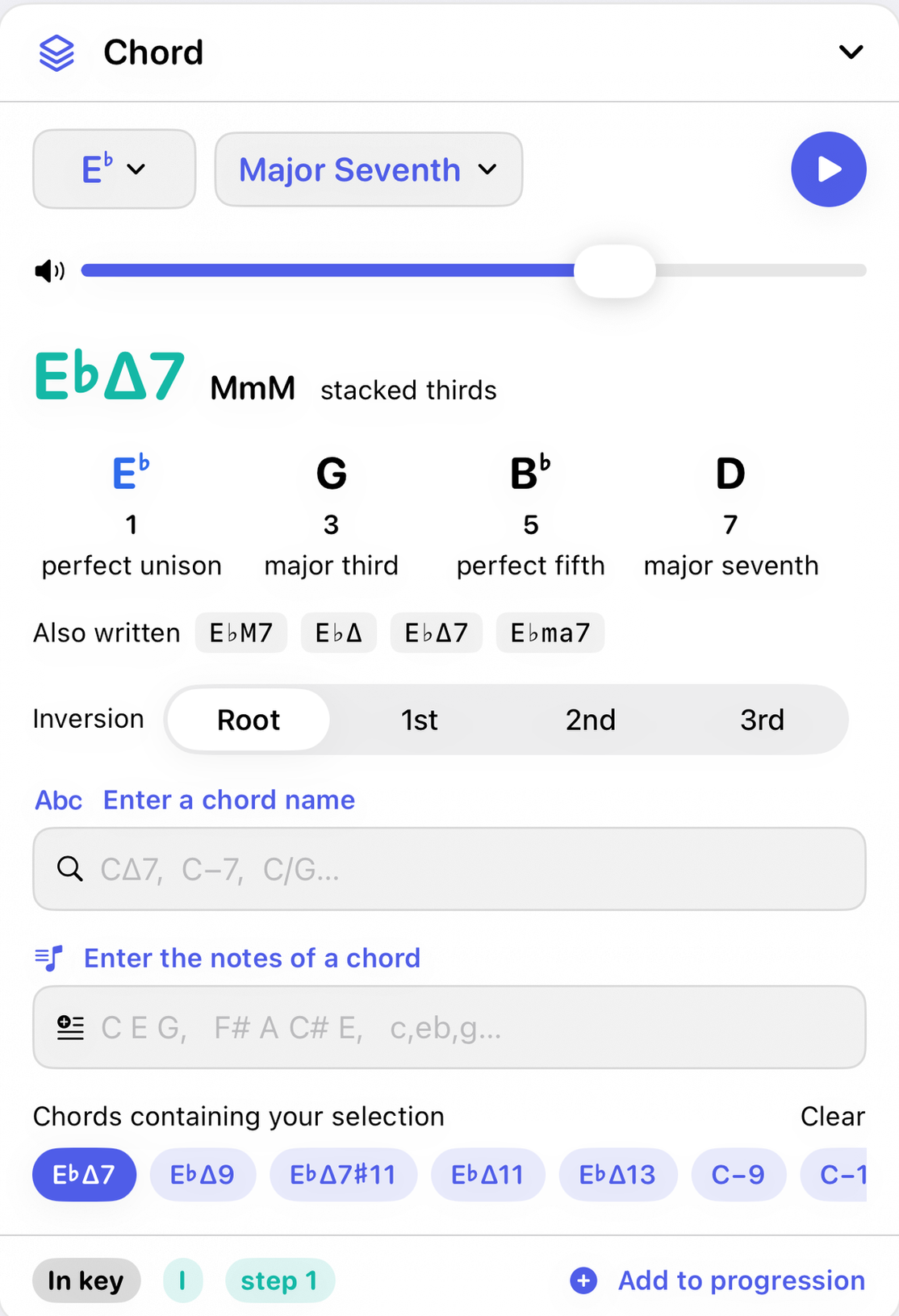
The top row
- Root
- The chord's root, from the same grid of flat, natural and sharp notes the Key panel uses.
- Chord type
- A searchable list of 52 types, grouped by family. Type
min7,øordominantin its search box to narrow it down. Changing the type returns the chord to root position. - Volume and Play
- Play sounds the chord as it is voiced, inversion included. With Arpeggiate chords on in Settings it rolls the notes instead of striking them together.
The chord itself
- Symbol and stacked thirds
- The chord's symbol, large, colored by its quality. Beside it, when the chord is built in thirds, the gaps it is built from:
MmMfor a major seventh,mMmfor a minor seventh. Chords that aren't built in thirds, such as sus, sixth and added-tone chords, don't show one. - Notes and intervals
- Each note of the chord, and under it the interval from the root, both as a number (1, ♭3, 5, ♭7) and in words (perfect unison, minor third, perfect fifth, minor seventh). The notes are listed from the bass up, so an inversion reads the way it sounds. The root is blue. Tap a note to hear it alone.
- Also written
- Up to four other ways the same chord is commonly written, such as
CM7,CΔandCma7for C major seventh. - Inversion
- Root, 1st, 2nd, and 3rd or more for larger chords. An inversion puts a chord tone other than the root in the bass. The note list, the Piano, the Notation staff and the Guitar shapes all re-voice to match.
Two ways to look a chord up
- Enter a chord name
- Type a symbol and press Return. Jazz glyphs (
CΔ7,C−7,Cø7), plain text (Cmaj7,Cm7b5) and slash chords (C/G) all work. Look-alike characters are folded, so the ∆ that ⌥J types on a Mac reads as Δ. Case matters where it should:CM7is a major seventh andCm7a minor seventh. If nothing matches, the field says so. - Enter the notes of a chord
- Type the notes and Chord Therapy tells you what they spell:
C E G,c,eb,g,F# A C# E. Spaces or commas, upper or lower case. The first note is taken as the bass, soE G Ccomes back as C/E, not plain C. A set that can be read more than one way offers every reading, with the one rooted on the bass first; tap one to choose it. Anything that isn't a note is pointed out, and it needs at least two notes.
Chords containing your selection
When you tap keys on the Piano, this row fills with every chord that contains those notes, up to eighteen. A filled pill is an exact match for what you tapped; a tinted one contains your notes and more. Tap a pill to make it the current chord. Clear empties the selection. Before you tap any keys, the row invites you to.
The footer
- In key or Outside key
- Whether every note of the chord belongs to the selected key.
- Roman numeral and step
- The chord's numeral in the key and the scale step its root sits on, such as
♭3for a chord built on a lowered third. - Add to progression
- Appends the chord to the progression selected in the Progressions panel. If that is a starter, you get your own copy to add to.
Every chord type
| Family | Types |
|---|---|
| Triads | major, minor, diminished, augmented, sus2, sus4, major flat five |
| Sixths | 6, minor 6, 6/9, minor 6/9 |
| Sevenths | major 7, dominant 7, minor 7, minor-major 7, half diminished, diminished 7, augmented 7, augmented major 7, 7sus4, 7sus2, 7♭5, major 7♭5 |
| Ninths | 9, major 9, minor 9, minor-major 9, 7♭9, 7♯9, augmented 9, 9♭5, minor 9♭5, 9sus4 |
| Elevenths | 11, major 11, minor 11, 7♯11, major 7♯11, half diminished 11 |
| Thirteenths | 13, major 13, minor 13, 13sus4, 7♭13 |
| Added tones | add9, minor add9, add11, minor add11, sus4 add9 |
| Other | power chord (5), major flat six, altered dominant |
Three ways to write a chord
Settings offers three notation styles. They change only how chords are drawn, never your saved progressions.
| Style | Major 7 | Minor 7 | Half diminished |
|---|---|---|---|
| Jazz | CΔ7 | C−7 | Cø7 |
| Plain text | Cmaj7 | Cm7 | Cm7b5 |
| Spelled out | C major seventh | C minor seventh | C half diminished |
How it works
Every chord type is a list of intervals above a root. Chord Therapy builds each note by counting letters first and then adjusting the sharp or flat, which is why a chord is always spelled the way it is written in music: the third of A♭ is C, not B♯, and the seventh of C♯7 is B, not C♭. When you type notes in, the app works with the sounds rather than the spellings to find matches, then spells the result the way the current chord or key suggests.
With the other panels
The current chord is shared. The Notation panel writes it, the Piano marks it, the Guitar finds shapes for it, and the Key panel outlines its card when it belongs to the key. Setting a chord anywhere else, from a Key card, a progression card or the Piano's Identify button, changes it here.