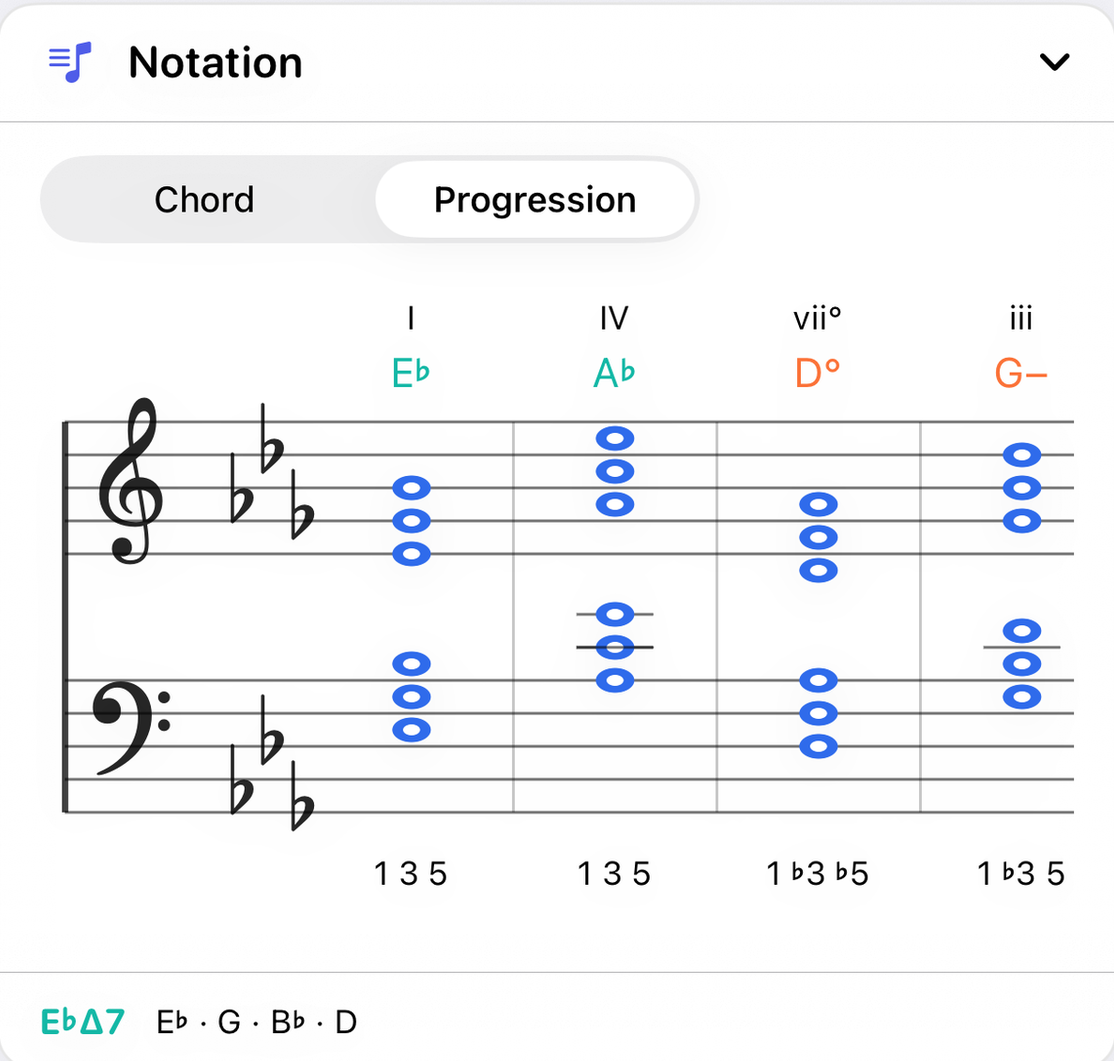
The Notation panel writes music on a grand staff, treble and bass together, the way a pianist reads it. It shows either the current chord on its own or the whole selected progression.
Chord or Progression
The switch at the top chooses what is written.
- Chord
- The current chord, alone. No key signature is written, so every note carries its own sharp or flat and the chord reads without knowing the key. This is the view to use for learning a chord's spelling.
- Progression
- The selected progression, one chord per bar, written in its own key with a key signature on both staves, as on a lead sheet. Only notes that differ from the signature carry an accidental. When a note has to cancel the signature, it gets a natural: an F♮ in G major is written with ♮.
What is written
- Above the staff
- The chord symbol, in your notation style. In Progression view each chord's roman numeral sits above its symbol.
- On the staff
- The notes as they are voiced, inversion included, split between the two staves. The treble clef sits on the G line and the bass clef's dots straddle the F line.
- Under the staff
- The chord tones as numbers, such as
1 ♭3 5, in the order the notes stack up from the bottom. - The footer
- The current chord's symbol and its notes, spelled out.
Color on the staff
A note that belongs to the current key is drawn in the ordinary note color. A note outside the key is drawn in red. The Piano and Guitar use amber for the same thing, but beside black noteheads red reads as an accidental, which is exactly what an out-of-key note is.
How it works
The staff is drawn from the same spelled notes as every other panel, so a chord the app calls A♭ is written with A♭ and never as G♯. Sharps, flats and naturals are engraved from a music font rather than typed, so they slant and sit the way they do in printed music. Key signatures are placed by convention, not calculated, because the order isn't a simple pattern: the third sharp, G♯, sits above the top line, and flats run in their own order.
Notation starts collapsed the first time you see it. Tap its title bar to open it, and it stays open from then on.
With the other panels
Chord view follows the Chord panel, including its inversion. Progression view follows the progression selected in the Chord progressions panel, and its key.